
Anime Cardverse Lobby NPC Locations and Travel Controls
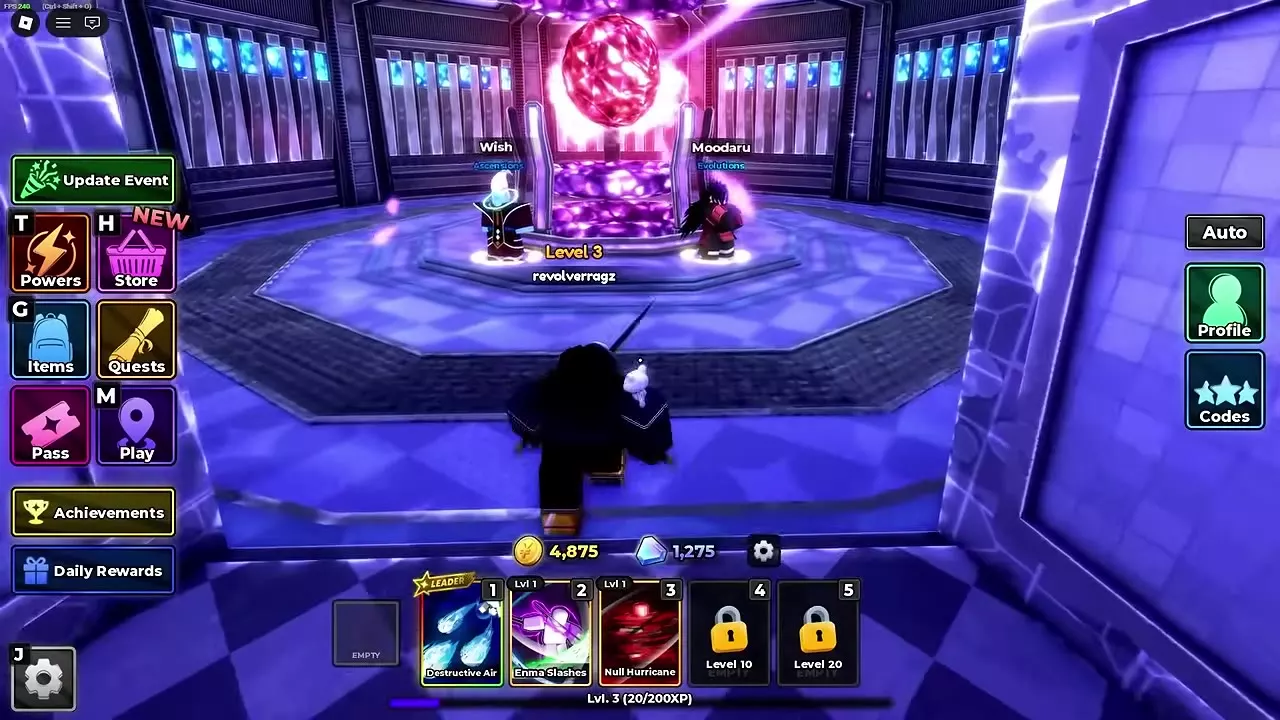
Find lobby services by their building signs, then use Play or the central Teleport Pad to choose an activity.
Look for Summons, Upgrades, Evolutions, and Play in the lobby. Select Play, press M, or use the central Teleport Pad to open the mode menu. From a World, choose Return to Lobby; after a Mission victory, choose Return.
Lobby Buildings and Service Signs
Use the building signs to find the right part of the lobby: Summons for banners, Upgrades for crafting and stat services, Evolutions for evolution and ascension, and Play for activity selection. NPC service labels identify the interaction once you arrive.
NPC Locations and Services
| NPC | Landmark | Service |
|---|---|---|
| Polnareffini | Inside Summons | Standard summons |
| Bamee | Upgrades | Crafting |
| Gilgamesh | Upgrades | Stat Potentials |
| Kusushibo | Upgrades | Power and Weapon Traits |
| Tragic | Near upgrade services | Stat Transfer |
| Moodaru | Evolutions | Power Evolutions |
| Wish | Evolutions | Power and Weapon Ascensions |
| Old Beard | Outside Upgrades | Level Milestones |
| Jaclien | Beside Summons | Group + Like Rewards |
| Bounty Swordsman | Bounty sign | Bounties |
At Summons, approach Polnareffini in the center, use Talk, and choose Summon. On a keyboard, press E at the interaction prompt. In Upgrades, follow the Crafting, Stat Potentials, Traits, and Stat Transfer labels. Moodaru and Wish stand beside one another in Evolutions.
Old Beard is near the Upgrades entrance, while Jaclien stands by the Group + Like Rewards sign. Look for the Bounty label above Bounty Swordsman; before Release Patch 1, this NPC stood inside the area called Stages.
Open Play and Return to the Lobby
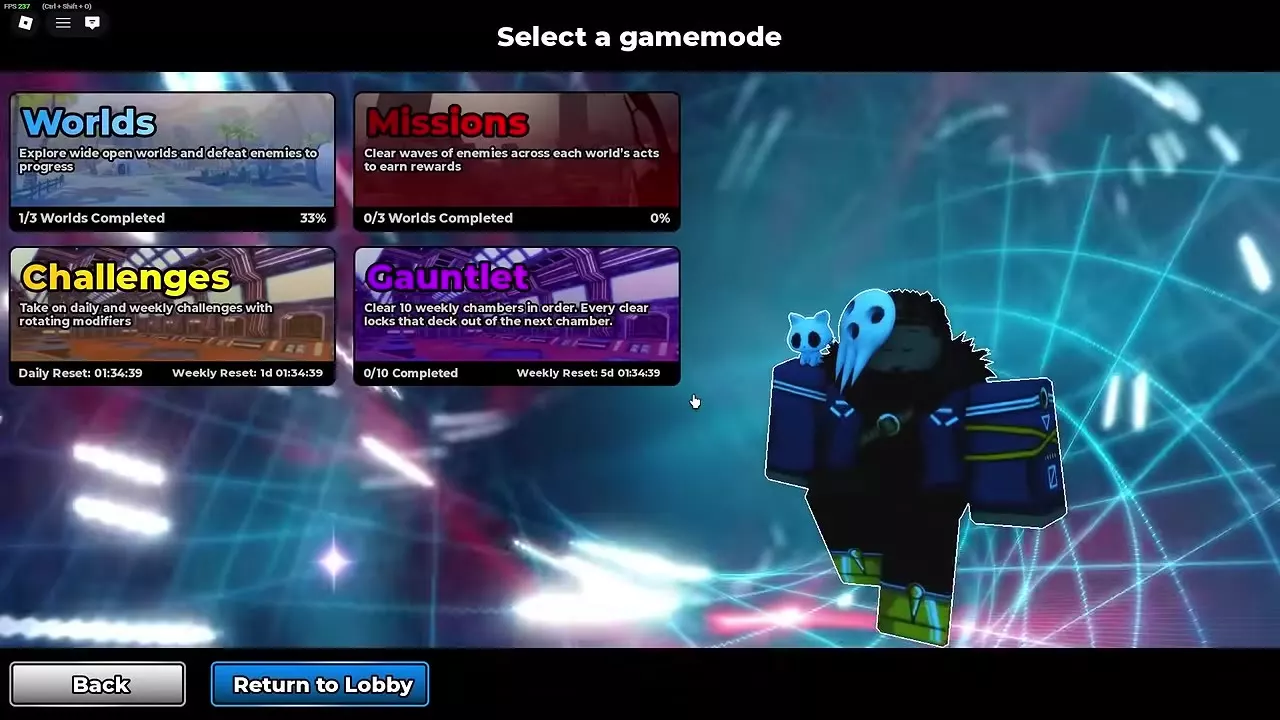
Open Select a gamemode in any of these ways:
- Select Play or press M on a keyboard.
- In the lobby, approach the central Teleport Pad and use the Teleport prompt; press E on a keyboard.
- Enter the Play area. From Release Patch 1 onward, walking into the area opens the mode menu.
Choose Worlds for open-world travel, Missions for wave-based acts, Challenges for rotating challenges, or Gauntlet for its weekly rooms. For an Invasion, open Worlds and select the world with the Invasion entry. See Worlds, unlocks, and battle modes for access requirements and routes.
Before Release Patch 1, the Play area was called Stages, and its entrance led to Missions.
Return from a World
- Select Play or press M.
- If a World or mode submenu is open, use Back until you reach Select a gamemode.
- Select Return to Lobby at the bottom of the menu.
To stay in the World, choose Back from the top-level mode menu instead. On a Mission victory screen, choose Return to go to the lobby; Retry replays the current act and Next advances to the following act.
Modes and NPC Guides
- Summon cards: Compare banners, rates, and pity in Summons.
- Craft materials: Find recipes and required ingredients in Crafting.
- Change traits or potentials: See Power Traits or Stat Potentials and Transfer.
- Upgrade forms and stars: Check Power Evolutions or Ascensions.
- Claim rewards: Find Old Beard's milestones in Player Levels and Milestones and Jaclien's reward conditions in Login, Group, and Achievement Rewards.
- Take a bounty: See Bounties for accepting targets and claiming rewards.
Articles and guides
3Anime Cardverse Lobby NPC Locations and Travel Controls
Find Anime Cardverse lobby NPCs by building and service sign, open the Play menu, and return to the lobby from a World or Mission.
Anime Cardverse Controls and Auto Combat Settings
Equip and reorder Powers, swap weapons, and set up Auto Cast, Auto Melee, Auto Aim, Auto Position, and Mission Auto Retry in Anime Cardverse.
Anime Cardverse Inventory: How to Lock and Sell Powers and Weapons
Free inventory space in Anime Cardverse, lock cards you want to keep, and sell Powers and Weapons individually or by rarity.