
Anime Cardverse Ascension Guide: Duplicate Card Requirements
Ascension uses duplicate Powers or Weapons to give a chosen copy a star. Choose the copy you want to keep before spending its duplicates at Wish.
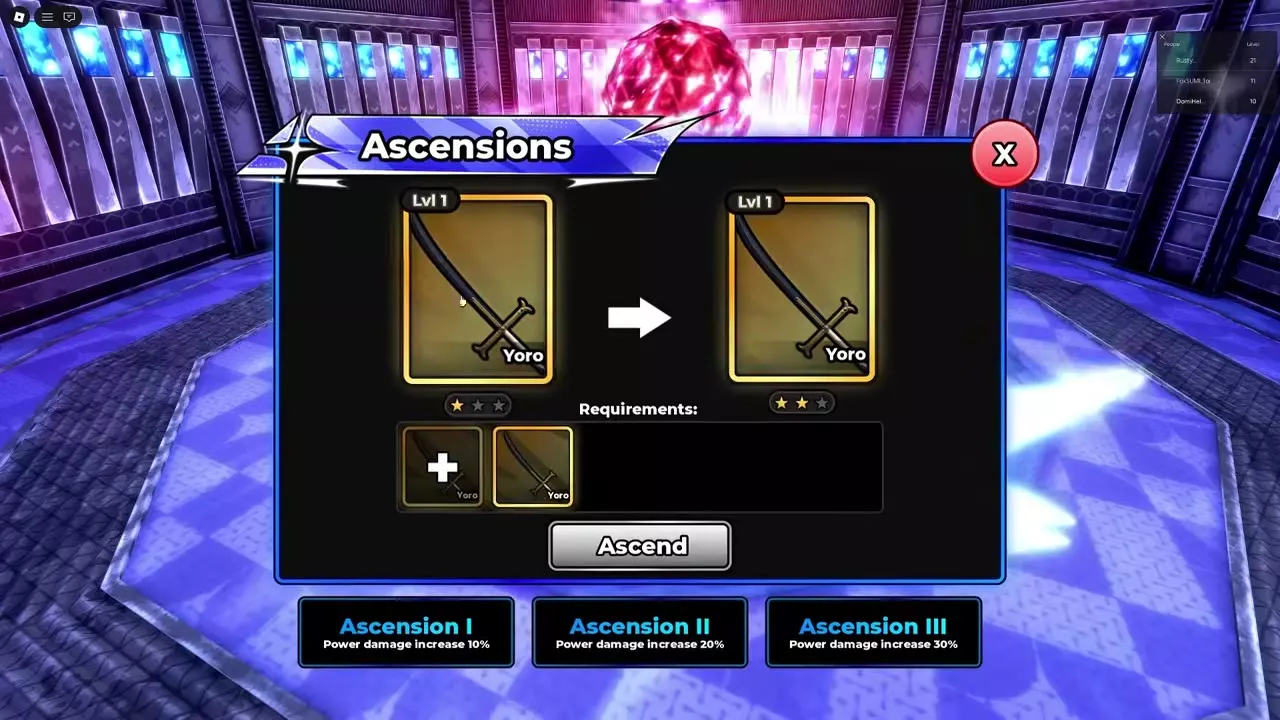
At Wish in the lobby’s Evolutions area, select Power Ascensions or Weapon Ascensions, choose your target, fill Requirements with same-name copies, and select Ascend. The target gains a star and the materials are consumed. Rasengan, Black Flash, and Yoro use one spare for their first star; Rasengan and Yoro require two more for their second.
Choose the Copy to Keep
Find Wish beside Moodaru in the lobby’s Evolutions area. Talk to Wish with E on PC, then choose Power Ascensions or Weapon Ascensions for the card you want to upgrade.
Compare individual copies in Powers, or in Items → Weapons, before choosing the target. Check their level, stars, Shiny status, active Trait Set, and stats. A Shiny Power deals 15% more attack damage. Gilgamesh’s Power Potentials and Weapon Potentials menus also let you compare individual potential rolls.
For repeated Power casts, favor higher damage and a shorter cooldown when the other relevant stats are equal. Keep a separate copy if its Shiny bonus, penetration, critical stats, or other modifiers suit another loadout. Set aside the same-name extras you are willing to consume.
Check Duplicate Requirements and Ascend
- Select the copy you want to keep in the left slot at Wish.
- Check the star preview on the right and fill Requirements with the requested same-name copies.
- Select Ascend once the requirements are filled. The target gains a star and the submitted copies are consumed.
- Dismiss the result and check the upgraded card in Powers or Items → Weapons. Select it again at Wish to see the next star’s requirements.
| Card | First star | Second star |
|---|---|---|
| Rasengan | 1 spare | 2 more spares |
| Black Flash | 1 spare | 2 more spares |
| Yoro | 1 spare | 2 more spares |
For Rasengan or Yoro, going from zero to two stars takes four copies in total: the target plus one spare for the first star and two more for the second. Count only the spare copies you are willing to consume. The Requirements panel shows the slots for your selected card’s next star.
Power Star Bonuses and the Yoro Result
Wish lists these Power damage increases for the three Ascension stages:
| Stage | Power damage increase |
|---|---|
| Ascension I | 10% |
| Ascension II | 20% |
| Ascension III | 30% |
For one Level 1 Legendary Yoro, the first star increased its displayed damage from 26.8 to 29.5. Its HP stayed at 78.9 and PEN at 20.3%. The consumed duplicate freed one Weapon storage slot, changing the counter from 100/100 to 99/100.
Lock Copies Before Selling or Evolving
Before a bulk sale, use Lock in Powers or Items → Weapons to protect your target and the spares you have set aside. Select the copies in Locking mode and check for the padlock badge. See inventory storage, locking, and selling for the full controls.
Ascension adds stars at Wish. Moodaru handles Power evolution and its material requirements, which changes a Power’s form. For help deciding which weapon to invest in, browse the weapon list.