
Anime Cardverse Stat Potentials, Rerolls, and Power Stat Transfer
Use Gilgamesh to check the potential grades on a specific Power or Weapon and improve its weakest rows. If you already have the Power potentials you want on another card, Tragic can move them to the card you plan to use.
At Gilgamesh, lock the rows you want to keep and spend 1 Stat Cube plus 1 per locked row to reroll the rest. Use a row’s plus button to improve just that stat for 1 Stat Prism. At Tragic, put the source Power in To Sacrifice and the receiving Power in To Keep, then select the potentials to transfer. Completing the transfer resets the source Power’s Traits, Levels, and Stat Potentials.
Potential Stats and Grades
Talk to Gilgamesh under Stat Potentials in the lobby’s Upgrades area. Choose Power Potentials or Weapon Potentials, then click the empty slot and select the card from Powers or the weapon from Items. Each row shows the selected copy’s percentage modifier and letter grade.
| Menu | Potential rows |
|---|---|
| Power Potentials | Damage, Cooldown, Penetration |
| Weapon Potentials | Damage, Health, Penetration |
A negative Cooldown (CD) modifier shortens the Power’s cooldown. For example, a Level 1 Destructive Air with −2.1% CD (C+) has a shorter cooldown from that potential.
The 13 grades in Filters, from highest to lowest, are SSS, SS, S, A+, A, A−, B+, B, B−, C+, C, C−, and D. To check what a grade is worth, open Index and choose the stat’s tab. In Weapon Potentials, those tabs are Damage, Health, and Penetration.
Weapon Damage ranges and roll chances
| Grade | Damage modifier | Roll chance |
|---|---|---|
| SSS | +22.9% to +25.0% | 0.25% |
| SS | +20.8% to +22.8% | 0.50% |
| S | +18.8% to +20.7% | 1.00% |
| A+ | +16.7% to +18.7% | 1.70% |
| A | +14.6% to +16.6% | 2.50% |
| A− | +12.5% to +14.5% | 3.50% |
| B+ | +10.4% to +12.4% | 4.85% |
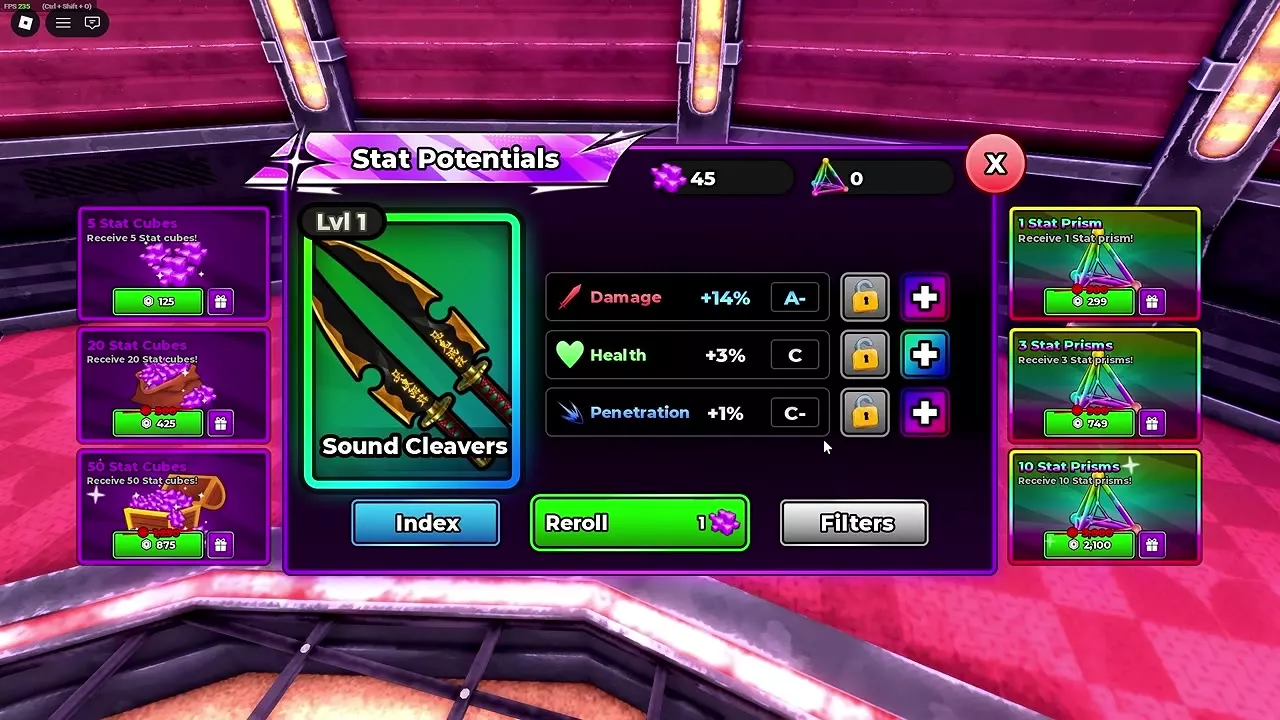
A Level 1 Sound Cleavers with +14% Damage (A−) is already near the top of its Damage band. If you want to improve that copy’s +3% Health (C) or +1% Penetration (C−), keep the Damage roll locked.

Lock Stats and Reroll With Stat Cubes
- Select a Power or Weapon at Gilgamesh. Click the lock beside each potential you want to keep. A locked row reads Stat locked [1x Stat Cube] and keeps its roll while the unlocked rows change.
- Open Filters, choose the grades to protect for each stat, and click Apply Filter. Use Reset Filter to reset your selections or Cancel to leave without applying changes.
- Check the displayed Cube cost. Click Reroll once for one attempt or hold it to reroll automatically. When Protected Stat flags a grade on an unlocked row, choose Keep to stop on the current roll or Reroll to continue. Lock any row you want to carry into the next attempt.
- Click a row’s lock again when you want to see its full percentage. Unlocking a row also puts it back into the next reroll.
| Locked rows | Stat Cubes per attempt |
|---|---|
| 0 | 1 |
| 1 | 2 |
| 2 | 3 |
The cost is 1 Cube plus 1 per locked row. With all three rows locked, the button displays 4 Stat Cubes. With two rows locked, a budget of 15 Cubes buys five attempts at the remaining row.
When to keep a roll
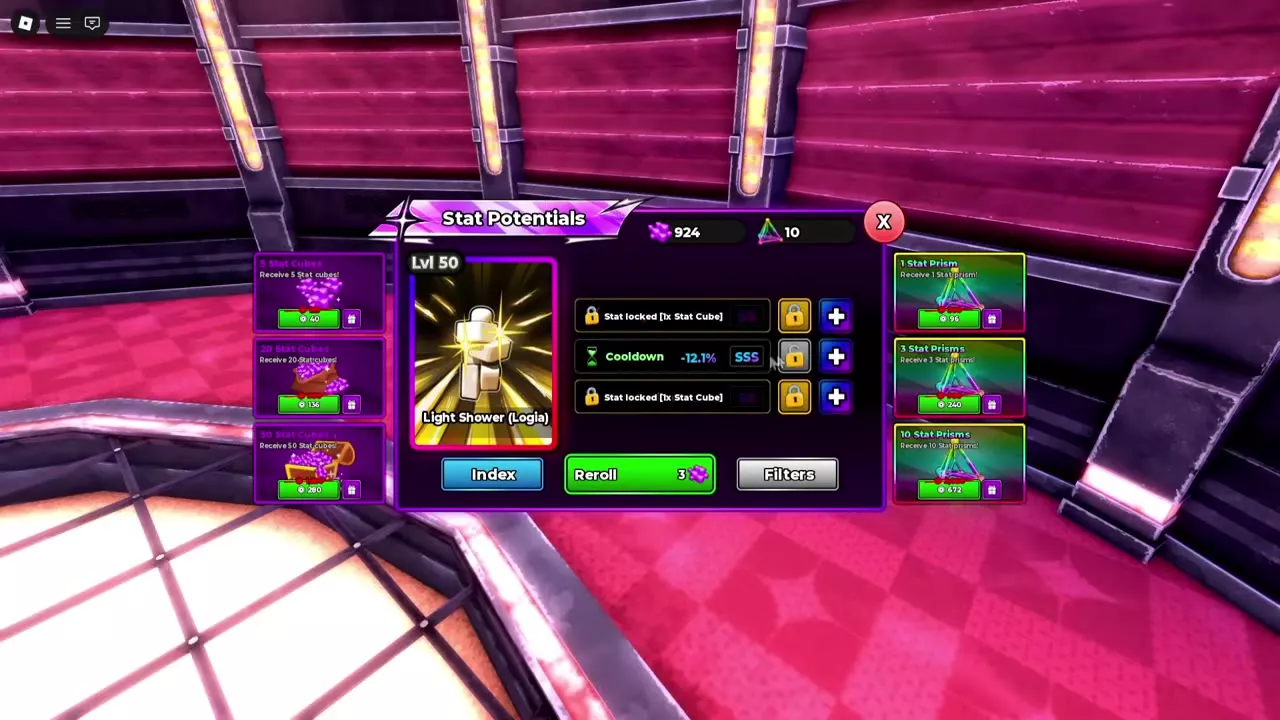
- Chasing a high-grade set. A Level 50 Light Shower (Logia) started with +22% Damage (SS), −6% Cooldown (B+), and +24% Penetration (S). Damage was locked first. Once Penetration rolled SS, locking it too left only Cooldown in play at 3 Cubes per attempt. Holding Reroll yielded −12.1% Cooldown (SSS), which was kept. On a Power you plan to invest heavily in, SS is a reasonable stopping point for a strong row while you improve the others.
- Working with a small Cube budget. A Level 1 Kamish Daggers kept +19% Penetration (A) locked at 2 Cubes per attempt. When its 20-Cube budget ran out, Damage and Health had fallen from +9% each (B) to +6.1% Damage and +5.8% Health, both C+. If both unlocked rows already serve your build, stop on a combination you would equip.
Raise a Single Stat With a Stat Prism
Select the item at Gilgamesh and click the + at the far right of the potential row you want to improve. Each use costs 1 Stat Prism. Read the updated percentage and grade on that row. The other two potentials stay in place, so use a Prism when you already like those rolls and want to improve just one stat.
On one Level 1 Catastrophe Moon, spending two Prisms across two rows raised Damage from +7.1% (B−) to +9.2% (B) and shortened Cooldown from −2.7% (C+) to −3.7% (B−). On the same card, one Prism on Penetration took it from +3.8% (C) to +5.4% (C+). A second Prism on that row took it to +8.7% (B−).

Transfer Power Potentials at Tragic
- Talk to Tragic under the Stat Transfer sign in Upgrades.
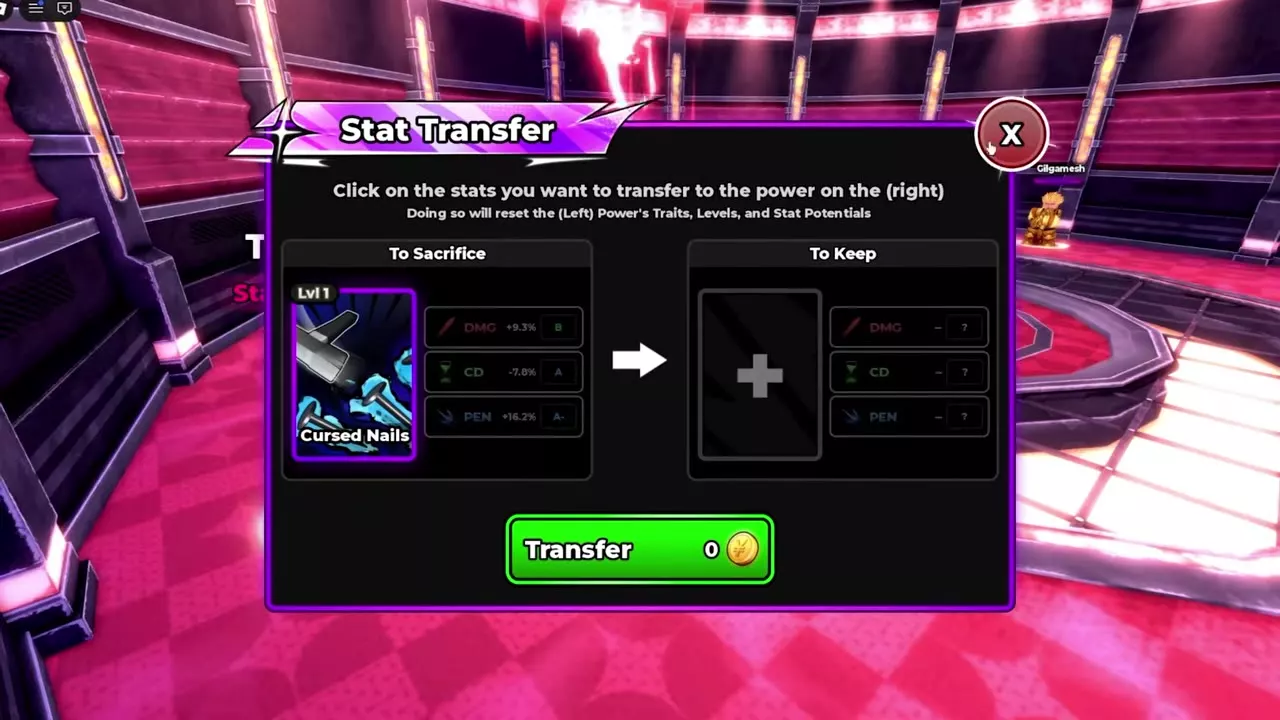
- Open To Sacrifice on the left and choose the source Power. For example, selecting a Level 1 Cursed Nails as the source can show +9.3% DMG (B), −7.0% CD (A), and +16.2% PEN (A−) in the left column.
- Open To Keep on the right and choose the receiving Power. Click the DMG, CD, or PEN rows you want to send to it.
- With both slots filled, check the selected stats and the Coin amount on Transfer. Click Transfer when you are ready to send those potentials to the right Power and reset the left Power’s Traits, Levels, and Stat Potentials.

Where to Get Cubes and Prisms
Choose Browse at Bob E.O.’s shop. A Stat Cube costs 5,000 Coins and a Stat Prism costs 100,000 Coins when in stock. Check the remaining quantity and the Shop Restock timer. Travelling Merchant locations and stock
- Daily quests for Cubes. Open Quests → Daily. Slay 100 Enemies awards 5 Stat Cubes for defeating 100 enemies in any World. Complete the other four daily tasks to earn 10 more from Complete All Daily Quests. Use Claim All to collect the completed rewards.
- Level milestones for both materials. Talk to Old Beard outside Upgrades, choose Open, and click Claim on each eligible tier. Player Level 5 gives 3 Stat Cubes, and Level 10 gives 1 Stat Prism. Full player level milestones
For more sources, including the free Season 1 Battlepass track and event rewards, see Materials and Upgrade Resources.