
Anime Cardverse Missions Guide
Missions are wave battles grouped into acts by world. Check the act’s loot and enemy modifiers before you run it solo, invite friends, or join a group.
Claim the final questline reward for the world you want to play. Open Play → Missions, select the world, then choose an act and difficulty. Select opens a room where you can press Play solo, invite friends, or queue for teammates. Matchmake on the act screen also looks for a group. After a win, use Retry to replay the act, Next to advance, or Return to go back to the lobby.
Mission Worlds and Questline Gates
Open Quests → Questline and press Claim after completing the final objective for that Mission world.
| Mission world | Final quest | Objective |
|---|---|---|
| Nemu’s Village | Nemu Quest #6 | Defeat 5 Freezers |
| Hollow World | Kisky Quest #6 | Defeat 5 Aizos |
| Demon Citadel | Sang Woo Quest #6 | Defeat 10 Belu |
Nemu’s final claim also opens travel to Hollow World. The second page of the Guide confirms that Missions are unlocked. If Play sends you back to the lobby with “Nemu’s Village isn’t unlocked yet,” check the final claim in Questline. The preparation room can open before you meet the requirement to start the battle.
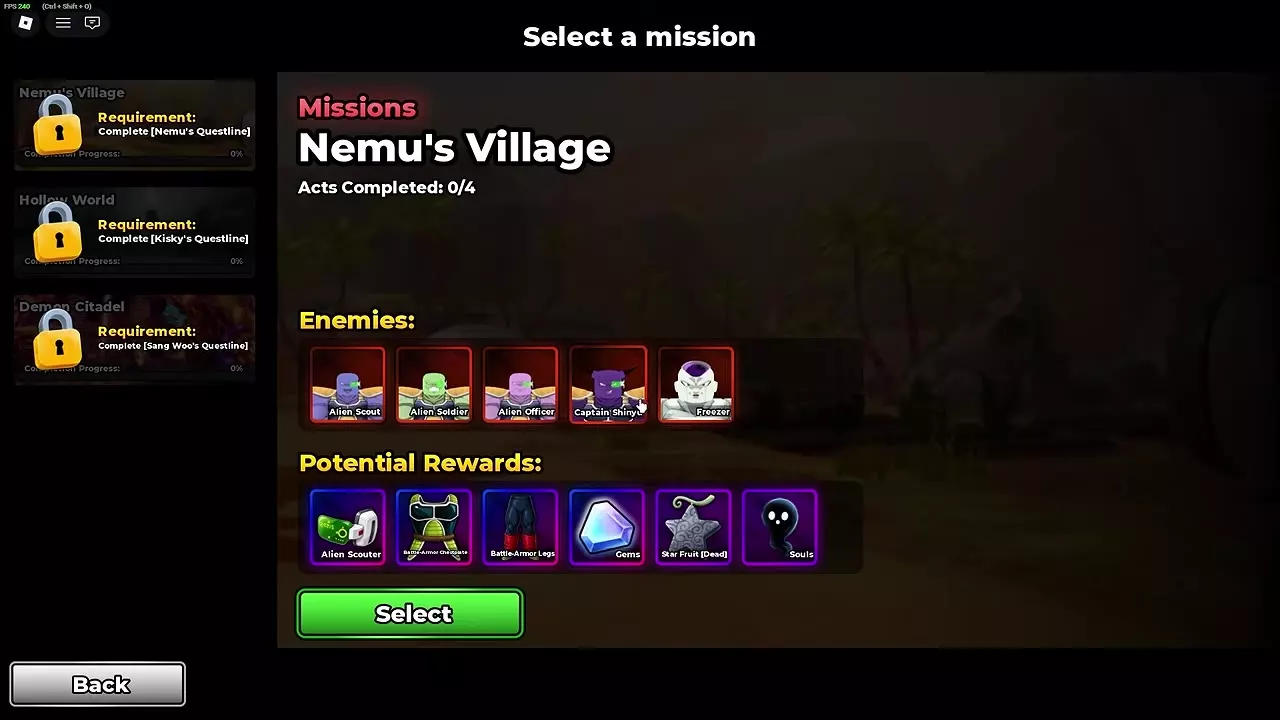
Use Completion Progress and Acts Completed to check how far you’ve cleared a world. Nemu’s Village counts four slots, shown as 1, 2, 3, and a skull icon. A green check marks a completed act, and a padlock marks one you can’t start yet.
Choose an Act and Read Its Rewards
- Open Play → Missions and choose a world. Check Enemies for the world’s opponents and Potential Rewards for its loot pool. Nemu’s Village lists Alien Scouts, Soldiers, and Officers, plus Captain Shinyu and Freezer. Its potential loot includes the Alien Scouter, Battle-Armor Chestplate, Battle-Armor Legs, Gems, Star Fruit [Dead], and Souls.
- Press Select on the world card. Pick an available act and choose Normal or Hard. Use Back on this screen to return to the world list.
- Read Rewards for that act and difficulty. A percentage is the listed drop chance on a clear. A Pity fraction shows your current progress toward that item’s target. For example, 0/5 means zero progress toward a target of five. Fastest Clear gives your best time for the selection, and Total Clears counts its wins. Check Victory after the run for the items you actually earned.
Check Stage Modifiers and Affinities before settling on your Powers. Bring sustained damage for Juggernaut’s extra health, save a follow-up attack for Undying’s resurrection, and bring a second element for Adaptive’s immunity. Read the rows on the card you’re about to launch. The Regular Challenge version of Nemu’s Village Act 1 can have Wind Affinity even when the Normal Mission’s Affinities row is empty. Stage Modifiers and Elemental Affinities
Normal Mode
Choose Normal for your act, then press Select to open the preparation room. Check the act, the Normal Mode label, and the Players list before you start.
| Goal | Control | Location |
|---|---|---|
| Start solo | Play | Preparation room |
| Bring friends | Invite | Preparation room |
| Find teammates | Queue or Matchmake | Preparation room |
| Match from the act screen | Matchmake | Act screen |
If you’re the only player in the room, Play starts a solo run. If you invited friends, check that they’re in the Players list before pressing Play. To change the act or difficulty, press Leave, make your selection again, and open the new room.
Hard Mode
Keep the same act selected and switch to Hard. Read its Stage Modifiers, Affinities, and Rewards again. Compare the drop chance and the Pity target for the item you want, then press Select and look for the Hard Mode label in the room before pressing Play.
In Nemu’s Village Act 1, Hard offers better listed rewards per clear and a lower Alien Scouter Pity target. Choose it for farming if you can clear it reliably. If Normal gives you more successful clears in the time you have, factor that in alongside the reward chances. Nemu’s Village Acts 1 and 2 walkthrough and reward comparison
Victory, Retry, Next, and Return
Defeat the remaining enemies in the final wave to open Victory. Check the act, difficulty, Total Damage, Clear Time, and Total Kills. Read the quantities on the reward icons and hover over an item for its tooltip.
- Retry replays the current act. Use it to keep farming that act’s drops.
- Next starts the next available act. After a Normal clear of Nemu’s Village Act 1, it takes you straight into Act 2.
- Return sends you to the lobby.
For automatic replays, enable Auto Retry under Settings → Auto during the Mission. It retries the stage three seconds after it ends. Turn it off before the final wave ends if you want to choose Next or Return. Controls and Auto Combat Settings
For the Win 5 Missions daily quest, clear five Missions on any difficulty, then claim 5 Trait Rerolls, 500 Gems, and 250 Battlepass EXP under Quests → Daily. Daily and Weekly Quest Goals and Rewards